> ## Documentation Index
> Fetch the complete documentation index at: https://asapp-04-04-getting-started-ga.mintlify.site/llms.txt
> Use this file to discover all available pages before exploring further.
# AutoTranscribe Updates
> New updates and improvements across AutoTranscribe
AutoTranscribe now includes a self-serve Custom Vocabulary feature that allows partners to manage business-specific keywords that improve transcription accuracy. Partners can independently add, update, and delete custom vocabulary terms through a new API.
This feature enables:
* Faster onboarding by reducing dependency on the ASAPP Delivery team
* More accurate transcriptions of industry-specific terminology and names that generic models often misinterpret
## How It Works
**Field Description**
| Field Name | Type | Description |
| --------------------------------- | ------ | ---------------------------------------------------------------------------------------------------------------- |
| custom-vocabularies | list | Custom vocabularies list
By default, the list will display up to 20 custom vocabs. Can be configured. |
| custom-vocabularies\[].id | string | System generated id |
| custom-vocabularies\[].phrase | string | The phrase to place in the transcribed text |
| custom-vocabularies\[].soundsLike | list | List of similar phrases for the received sound |
| nextCursor | id | Next field ID
Will be null for the first page |
| prevCursor | id | Previous field ID
Will be null for the last page |
**API Endpoints**
1. List all custom vocabs
`GET /configuration/v1/auto-transcribe/custom-vocabularies`
Sample response
```json
{
"customVocabularies":
[
{
"id": "563a0954-1db7-4b96-bf21-fa84de137742",
"phrase": "IEEE",
"soundsLike": [
"I triple E"
]
},
{
"id": "7939d838-774c-46fe-9f18-5ebf15cf3e9c",
"phrase": "NATO",
"soundsLike": [
"Nae tow",
"Naa toe"
]
}
],
"nextCursor": "4c576035-870e-47cf-88ef-8d29e6b5d7e8",
"prevCursor": null
}
```
2. Details of a particular custom vocab
`GET /configuration/v1/auto-transcribe/custom-vocabularies/\{customVocabularyId\}`
Sample response
```json
{
"id": "6B29FC40-CA47-1067-B31D-00DD010662DA",
"phrase": "IEEE",
"soundsLike":[
"I triple E"
]
}
```
3. Create a custom vocab
`POST /configuration/v1/auto-transcribe/custom-vocabularies`
Sample Request
```json
{
"phrase": "IEEE",
"soundsLike": [
"I triple E"
]
}
```
Sample response
```json
{
"id": "6B29FC40-CA47-1067-B31D-00DD010662DA",
"phrase": "IEEE",
"soundsLike":[
"I triple E"
]
}
```
4. Delete a custom vocab
`DELETE /configuration/v1/auto-transcribe/custom-vocabularies/\{customVocabularyId\}`
## FAQs
* **Can I modify the custom vocabulary after it's been created?**
Yes, users can update the custom vocabulary at any time. To do so, first delete the existing vocabulary and then submit a new create request.
This process ensures that the vocabulary remains current and relevant.
* **Can I send the create request for multiple custom vocab additions?**
Currently multiple custom vocab addition capability is not live, users must submit individual create requests for each addition.
That said, If a large number of additions are required, please contact ASAPP's support team for assistance.
* **Is there a limit to the number of custom vocabularies that can be added?**
Yes, The maximum number of custom vocabulary entries is 200. However, this limit is subject to change as ASAPP continuously updates and expands its backend capabilities to support more custom vocab.
* **Is there a limit to the number of sounds like items within the custom vocab?**
The maximum number of sounds like items should be 5 and length of each item should be 40 characters
AutoTranscribe now includes a self-serve feature that allows users to manage redaction entities through a configuration API. This enables users to independently enable or disable redaction of PCI and PII data in their transcriptions.
Key benefits:
* Self-service configuration of which sensitive data types to redact
* Automated redaction of enabled entities during transcription
* Faster onboarding with reduced dependency on ASAPP teams
Some PCI rules are enabled by default for compliance and require ASAPP approval to modify.
## How It Works
The API Calls take a single conversation identifier and immediately returns an array of messages that covers the full conversation.
| Field Name | Type | Description |
| :------------------------------- | :------ | :-------------------------------------------------------- |
| redactionEntities | array | Available redaction rules |
| redactionEntities\[].id | String | The id of the redaction rule. Also a human readable name. |
| redactionEntities\[].name | String | Name of the redaction entity |
| redactionEntities\[].description | String | Field Description |
| redactionEntities\[].active | Boolean | Indicates whether the redaction rule is active |
1. **List redaction entities**
`GET /configuration/v1/redaction/redaction-entities`
Sample Response
```json
{
"redactionEntities": [
{
"id": "DOB",
"name": "DOB",
"description": "It redacts Data of birth content of data",
"active": false
},
{
"id": "PASSWORD",
"name": "PASSWORD",
"description": "It redacts passwords",
"active": true
},
{
"id": "PROFANITY",
"name": "PROFANITY",
"description": "It redacts words and phrases present in a list of known bad words",
"active": false
},
{
"id": "EMAIL",
"name": "EMAIL",
"description": "It redacts any well-formed email address (abc@asapp.com)",
"active": true
},
{
"id": "PHONE_NUMBER",
"name": "PHONE_NUMBER",
"description": "Redacts sequences of digits that could be phone numbers based on phone number formats.",
"active": false
},
{
"id": "CREDIT_CARD_NUMBER",
"name": "CREDIT_CARD_NUMBER",
"description": "Redacts credit card data",
"active": true
},
{
"id": "PIN",
"name": "PIN",
"description": "Redacts the pin",
"active": true
},
{
"id": "SSN",
"name": "SSN",
"description": "It redacts all the digits in next few sentences containing ssn keyword",
"active": true
}
],
"nextCursor": null,
"prevCursor": null
}
```
2. **List current active redaction entities**
`GET/configuration/v1/redaction/redaction-entities?active=true`
Querying the redaction entities with the active flag shows which redaction rules are currently active.
By default, all auto-enabled entities will be active for every user, however, users can update these rules to suit their individual needs
Sample Response
```json
{
"redactionEntities": [
{
"id": "PASSWORD",
"name": "PASSWORD",
"description": "It redacts passwords",
"active": true
},
{
"id": "EMAIL",
"name": "EMAIL",
"description": "It redacts any well-formed email address (test@asapp.com)",
"active": true
},
{
"id": "CREDIT_CARD_NUMBER",
"name": "CREDIT_CARD_NUMBER",
"description": "Redacts credit card data",
"active": true
},
{
"id": "PIN",
"name": "PIN",
"description": "Redacts the pin",
"active": true
},
{
"id": "SSN",
"name": "SSN",
"description": "It redacts all the digits in next few sentences containing ssn keyword",
"active": true
}
],
"nextCursor": null,
"prevCursor": null
}
```
3. **Fetch a redaction entity:**
`GET /configuration/v1/redaction/redaction-entity/\{entityId\}`
Sample Response
```json
HTTP 200
// Returns the redaction entity resource.
```
4. **Activate or Disable a redaction entity**
Change an entity to active or not by setting the active flag.
`PATCH /configuration/v1/redaction/redaction-entity/\{entityId\}`
Sample Request Body
```json
{
"active":true
}
```
On success, returns HTTP 200 and the Redaction entity resource.
Sample Response
```json
{
"id": "PASSWORD",
"name": "PASSWORD",
"description": "It redacts passwords",
"active": true
}
```
### Example Entities
Below is a list of some sample entities:
**PCI (Payment Card Industry)**
| Entity Label | Status | Description |
| -------------------- | ------------ | -------------------------------------------------------------------------------------------------------------------------------------------------------------------------------------------- |
| CREDIT\_CARD\_NUMBER | auto-enabled | Credit card numbers
Non-redacted: 0111 0111 0111 0111
Redacted: \*\*\*\* \*\*\*\* \*\*\*\*1312
Cannot be changed/updated without ASAPP’s security approval. |
| CVV | auto-enabled | 3- or 4-digit card verification codes and/or equivalents
Non-redacted: 561
Redacted: \*\*\*
Cannot be changed/updated without ASAPP’s security approval. |
**PII (Personally Identifiable Information)**
| Entity Label | Status | Description |
| ------------- | ------------ | -------------------------------------------------------------------------------------------------------------------------- |
| PASSWORD | auto-enabled | Account passwords
Non-redacted: qwer1234
Redacted: \*\*\*\*\*\*\* |
| PIN | auto-enabled | Personal Identification Number
Non-redacted: 5614
Redacted: \*\*\*\* |
| SSN | auto-enabled | Social Security Number
Non-redacted: 012-03-1134
Redacted: \***-**-1134 |
| EMAIL | not enabled | Email address
Non-redacted: [test@asapp.com](mailto:test@asapp.com)
Redacted: \*\*\*@asapp.cpm |
| PHONE\_NUMBER | not enabled | Telephone or fax number
Non-redacted: +11234567891
Redacted: \*\*\*\*\*\*\*\*\*\*\* |
| DOB | not enabled | Date of Birth
Non-redacted: Jan 31, 1980
Redacted: \*\*\*\*\*\* |
| PROFANITY | not enabled | Profanities or banned vocabulary
Non-redacted: "silly"
Redacted: \*\*\*\*\* |
## FAQs
* **What is an entity?**
In the context of redaction, an entity refers to a specific type or category of information that you want to remove or obscure from the response text. Entities are the "labels" for the pieces of information you want redacted. For example, "NAME" is an entity that represents personal names, "ADDRESS" represents physical addresses, and "ZIP" represents postal codes. When you wish to redact, you specify which entities you want redacted from your text.
* **Can I delete existing redaction entities?**
Users can only enable or disable the predefined entities listed in the previous section. Due to PCI compliance regulations, two entities (CREDIT\_CARD\_NUMBER and CVV) are initially disabled and can only be removed through ASAPP's compliance process. All other entities are not enabled by default, but users have the flexibility to enable any of these according to their specific requirements. Users cannot create new entities or modify existing ones; they can only control the activation status of the predefined set.
* **What is the accuracy of the redaction service of ASAPP?**
Our redaction service currently supports over 50 Out of the box (OOTB) entities, with the flexibility to expand and update this set as required. For specific entity customization, including enabling or disabling particular entities or suggesting new entities to tailor to your specific needs, please contact ASAPP's support team.
ASAPP is adding an AutoTranscribe implementation pattern for Amazon Connect. ASAPP's Amazon Connect Media Gateway will allow Kinesis Video Streams audio to be easily sent to AutoTranscribe.
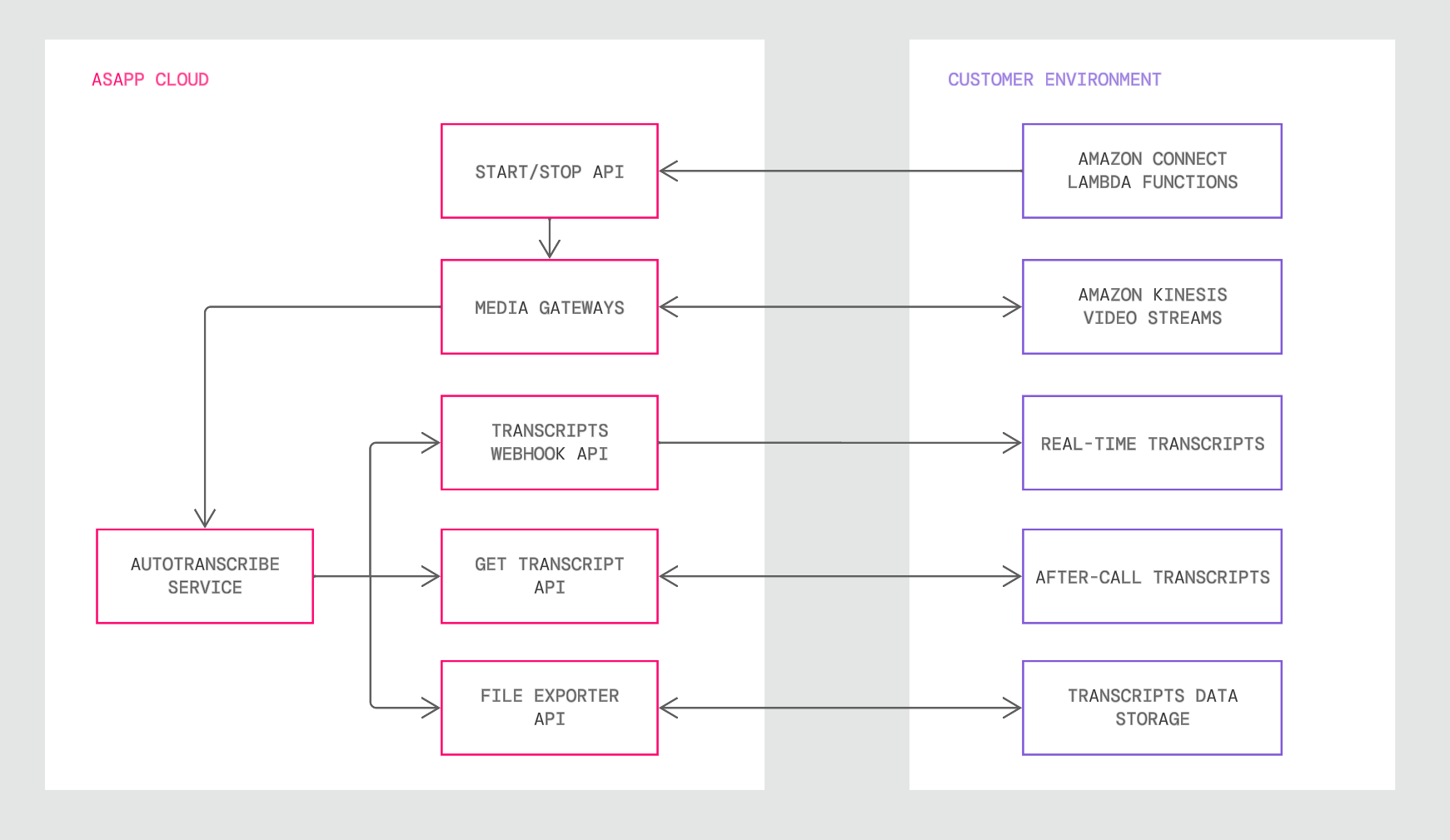 Learn more about the Amazon Connect Media Gateway for AutoTranscribe
[AutoTranscribe Sandbox](/autosummary/sandbox) enables administrators to see speech-to-text capabilities designed for real-time agent assistance. Accessible through AI-Console, it's a playground designed to preview ASAPP's transcription without waiting for an integration to complete.
Learn more about the Amazon Connect Media Gateway for AutoTranscribe
[AutoTranscribe Sandbox](/autosummary/sandbox) enables administrators to see speech-to-text capabilities designed for real-time agent assistance. Accessible through AI-Console, it's a playground designed to preview ASAPP's transcription without waiting for an integration to complete.
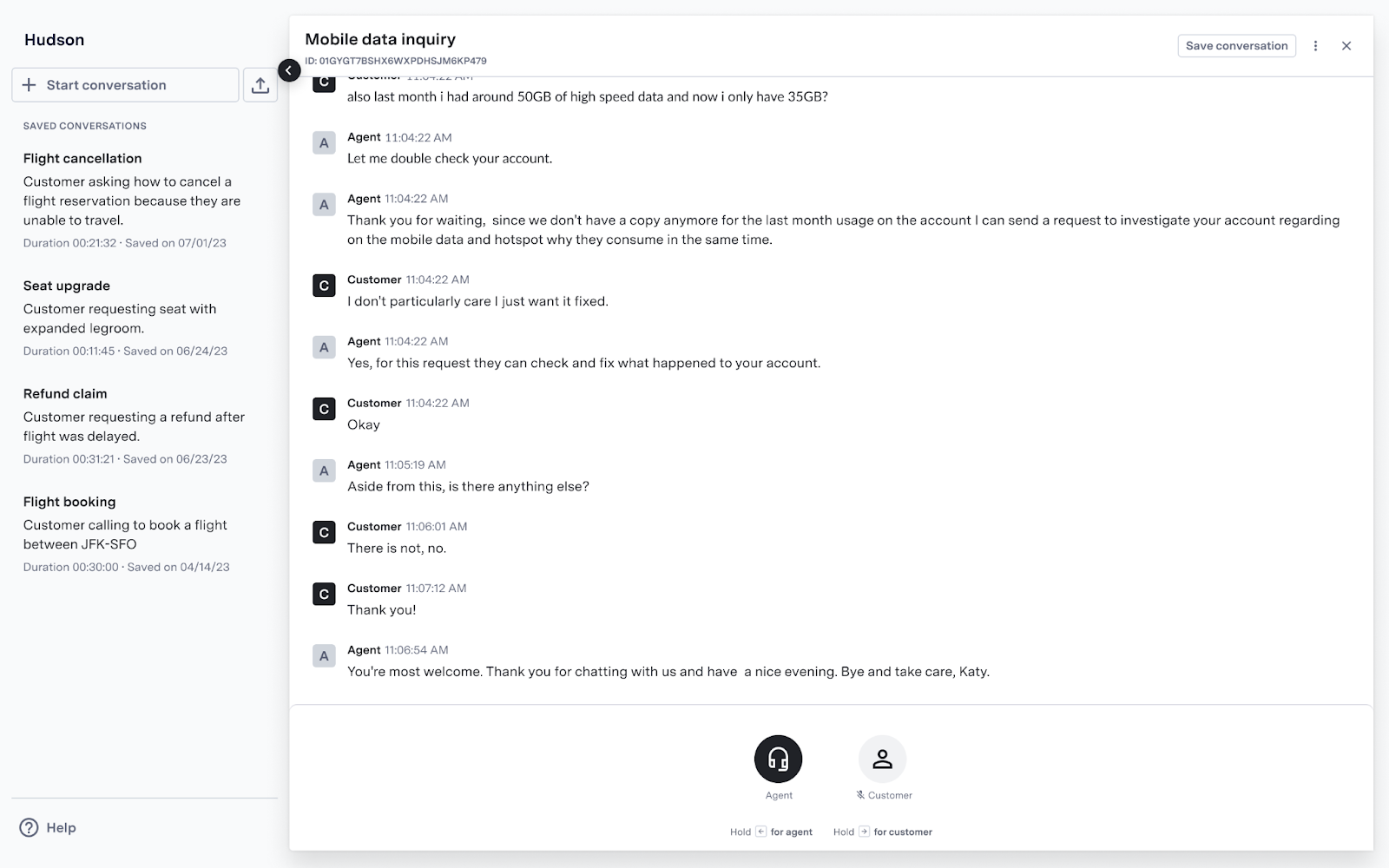 *AutoTranscribe showing conversation transcriptions in a sandbox environment.*
Watch the following video walkthrough to learn how to use the AutoTranscribe Sandbox:
ASAPP is adding an AutoTranscribe implementation pattern for Twilio. ASAPP's Twilio Media Gateway will allow Twilio Media Streams audio to be easily sent to AutoTranscribe.
*AutoTranscribe showing conversation transcriptions in a sandbox environment.*
Watch the following video walkthrough to learn how to use the AutoTranscribe Sandbox:
ASAPP is adding an AutoTranscribe implementation pattern for Twilio. ASAPP's Twilio Media Gateway will allow Twilio Media Streams audio to be easily sent to AutoTranscribe.
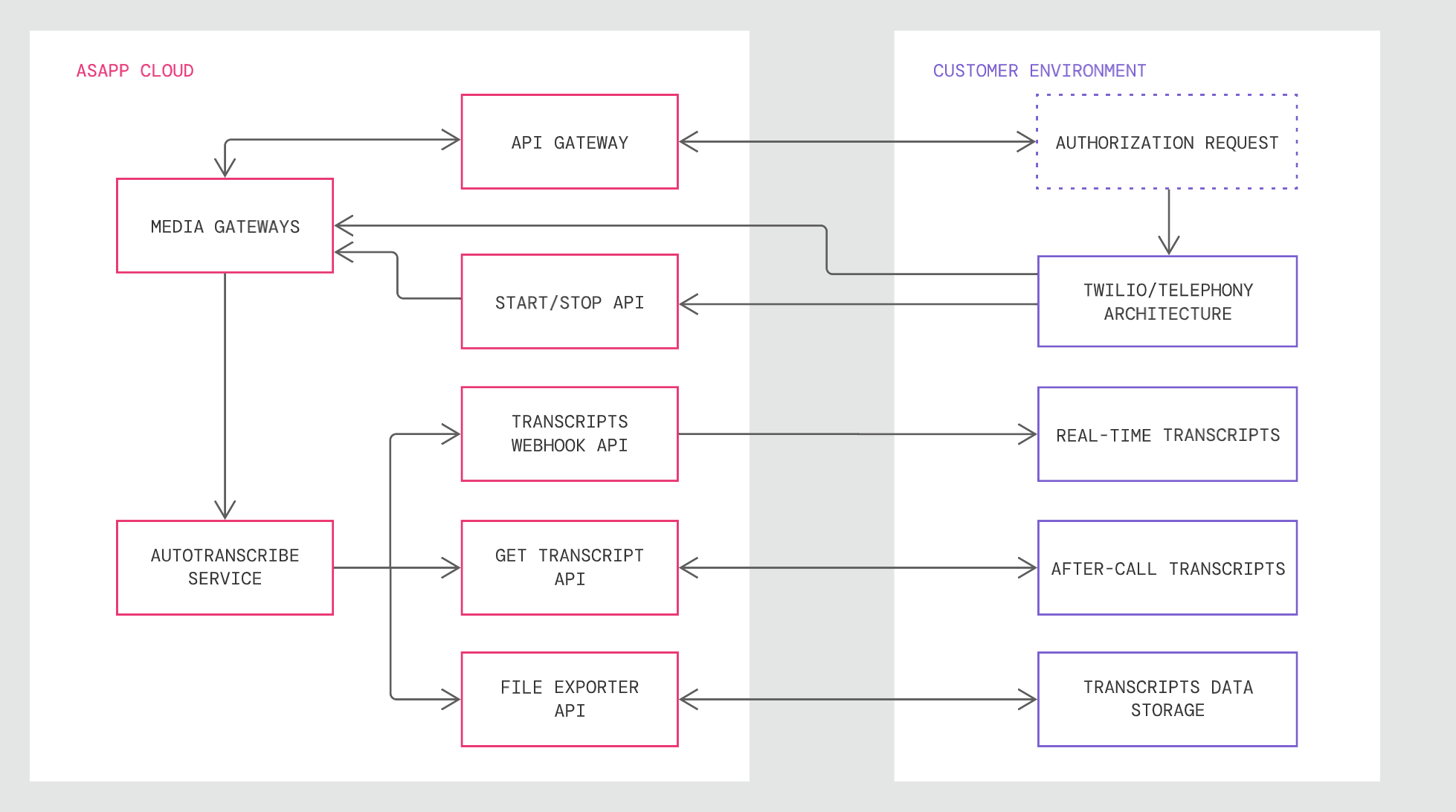 The new Media Gateway will allow for a simplified and easy integration for customers leveraging Twilio as their CCaaS provider, reducing time and effort of sending call media to ASAPP.
Learn more about integrating Twilio Media Gateway with AutoTranscribe
ASAPP is adding a new endpoint that retrieves the full set of messages for a specified conversation. This expands the delivery use cases for AutoTranscribe, providing a means to get a complete transcript at the end of a conversation on-demand, instead of in real-time during the conversation or in daily batches of conversations.
It also serves as a fallback option to retrieve conversation messages in rare cases where real-time transcript delivery fails.
Learn more about using the Get Transcript API
The new Media Gateway will allow for a simplified and easy integration for customers leveraging Twilio as their CCaaS provider, reducing time and effort of sending call media to ASAPP.
Learn more about integrating Twilio Media Gateway with AutoTranscribe
ASAPP is adding a new endpoint that retrieves the full set of messages for a specified conversation. This expands the delivery use cases for AutoTranscribe, providing a means to get a complete transcript at the end of a conversation on-demand, instead of in real-time during the conversation or in daily batches of conversations.
It also serves as a fallback option to retrieve conversation messages in rare cases where real-time transcript delivery fails.
Learn more about using the Get Transcript API